Запросы представлены объектом yii \ web \ Request , который предоставляет информацию о заголовках HTTP, параметрах запроса, файлах cookie и т. Д.
Методы get () и post () возвращают параметры запроса компонента запроса.
Пример —
$req = Yii::$app->request;
   /*
   * $get = $_GET;
   */
   $get = $req->get();

   /*
   * if(isset($_GET['id'])) {
   *     $id = $_GET['id'];
   * } else {
   *     $id = null;
   * }
   */
   $id = $req->get('id');

   /*
   * if(isset($_GET['id'])) {
   *     $id = $_GET['id'];
   * } else {
   *     $id = 1;
   * }
   */
   $id = $req->get('id', 1);

   /*
   * $post = $_POST;
	*/
   $post = $req->post();

   /*
   * if(isset($_POST['name'])) {
   *     $name = $_POST['name'];
   * } else {
   *     $name = null;
   * }
   */
   $name = $req->post('name');

   /*
   * if(isset($_POST['name'])) {
   *     $name = $_POST['name'];
   * } else {
   *     $name = '';
   * }
   */
   $name = $req->post('name', '');
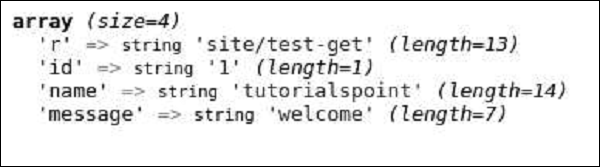
Шаг 1 — Добавьте функцию actionTestGet в SiteController базового шаблона приложения.
public function actionTestGet() {
   var_dump(Yii::$app->request->get());
}
Шаг 2 — Теперь перейдите по адресу http: // localhost: 8080 / index.php? R = site / testget & id = 1 & name = tutorialspoint & message = welcome , вы увидите следующее.
Чтобы получить параметры других методов запроса (PATCH, DELETE и т. Д.), Используйте метод yii \ web \ Request :: getBodyParam () .
Чтобы получить метод HTTP текущего запроса, используйте свойство Yii :: $ app → request → method .
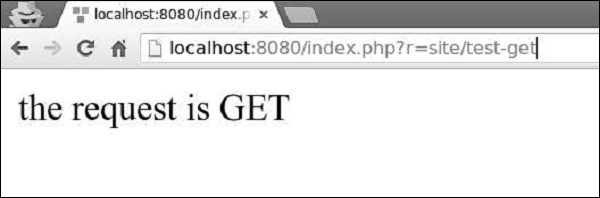
Шаг 3 — Измените функцию actionTestGet, как показано в следующем коде.
public function actionTestGet() {
   $req = Yii::$app->request;
   if ($req->isAjax) {
      echo "the request is AJAX";
   }
   if ($req->isGet) {
      echo "the request is GET";
   }
   if ($req->isPost) {
      echo "the request is POST";
   }
   if ($req->isPut) {
      echo "the request is PUT";
   }
}
Шаг 4 — Перейдите на http: // localhost: 8080 / index.php? R = site / test-get . Вы увидите следующее.
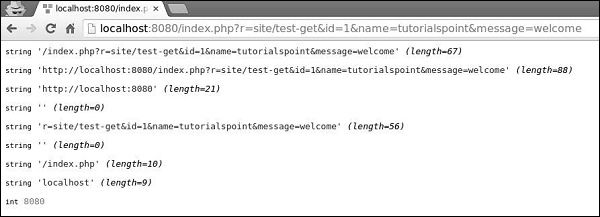
Компонент запроса предоставляет множество свойств для проверки запрошенного URL.
Шаг 5 — Измените функцию actionTestGet следующим образом.
public function actionTestGet() {
   //the URL without the host
   var_dump(Yii::$app->request->url);

   //the whole URL including the host path
   var_dump(Yii::$app->request->absoluteUrl);

   //the host of the URL
   var_dump(Yii::$app->request->hostInfo);

   //the part after the entry script and before the question mark
   var_dump(Yii::$app->request->pathInfo);

   //the part after the question mark
   var_dump(Yii::$app->request->queryString);

   //the part after the host and before the entry script
   var_dump(Yii::$app->request->baseUrl);

   //the URL without path info and query string
   var_dump(Yii::$app->request->scriptUrl);

   //the host name in the URL
   var_dump(Yii::$app->request->serverName);

   //the port used by the web server
   var_dump(Yii::$app->request->serverPort);
}
Шаг 6 — В адресной строке веб-браузера введите http: // localhost: 8080 / index.php? R = site / testget & id = 1 & name = tutorialspoint & message = welcome , вы увидите следующее.
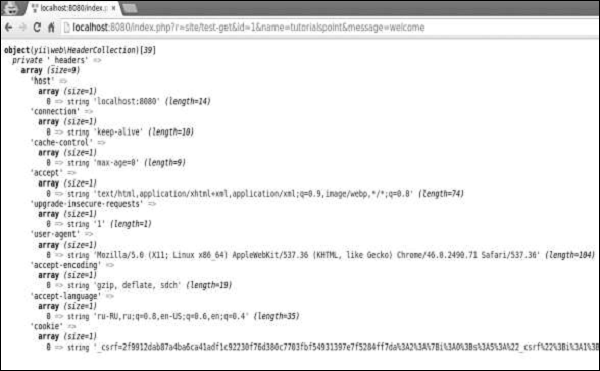
Шаг 7 — Чтобы получить информацию заголовка HTTP, вы можете использовать свойство yii \ web \ Request :: $ headers . Модифицируйте функцию actionTestGet таким образом.
public function actionTestGet() {
   var_dump(Yii::$app->request->headers);
}
Шаг 8. Если вы перейдете по URL-адресу http: // localhost: 8080 / index.php? R = site / testget & id = 1 & name = tutorialspoint & message = welcome , вы увидите вывод, как показано в следующем коде.
Чтобы получить имя хоста и IP-адрес клиентского компьютера, используйте свойства userHost и userIP .
Шаг 9 — Модифицируйте функцию actionTestGet таким образом.
public function actionTestGet() {
   var_dump(Yii::$app->request->userHost);
   var_dump(Yii::$app->request->userIP);
}
Шаг 10 — Перейдите по адресу http: // localhost: 8080 / index.php? R = site / test-get и вы увидите следующий экран.